Company for your next walk
You’re heading out for some fresh air — maybe with your dog in tow. Someone nearby enjoys a walk too. A shared route gives you time to talk, and four-legged friends make great company.

Live now on iOS and Android
A walking partner. A gym buddy. Someone to talk books with. ProxiMeet helps you find people nearby who are into what you’re into — and turn a shared interest into time together.
Free to download. Not in your city yet? Join the waitlist — we’re rolling out city by city.
Ways to connect
You don’t need a big occasion to meet someone. Same place, different possibilities — start with something you’d like to do together.
You’re heading out for some fresh air — maybe with your dog in tow. Someone nearby enjoys a walk too. A shared route gives you time to talk, and four-legged friends make great company.
You’re planning a workout and the energy is better with two. Arrange a session with someone who shares your interest in fitness, encourage each other, and celebrate the effort together.

You’ve finished a book and want to talk about it. Meet someone who enjoys reading, swap recommendations, and discover what you might pick up next.

You have an idea for a project, a photo shoot, or something you’d like to make. Connect with someone nearby who shares that interest, talk it through, and see what you could create together.
For moments like this
Find someone nearby to chat, hang out, or share an activity with.
How it works
Tell people what you enjoy and what you’d like to do together. It gives you something to talk about from the start.
Discover people nearby with interests in common. When someone feels like a good fit, send a connection request.
Once your request is accepted, agree on a public meeting spot nearby. Use notes to sort out the details, then continue the conversation face to face.
A look at the app
A café downtown. The gym at 6 a.m. A conference in a city you’ve never set foot in. Wherever you are, open ProxiMeet and the map comes alive — people nearby, online for the same reasons as you, from networking to a workout to a walk.
Set your reasons, and when someone nearby matches them, you both already know why you’re saying hi.
Get the appSafety & Choice
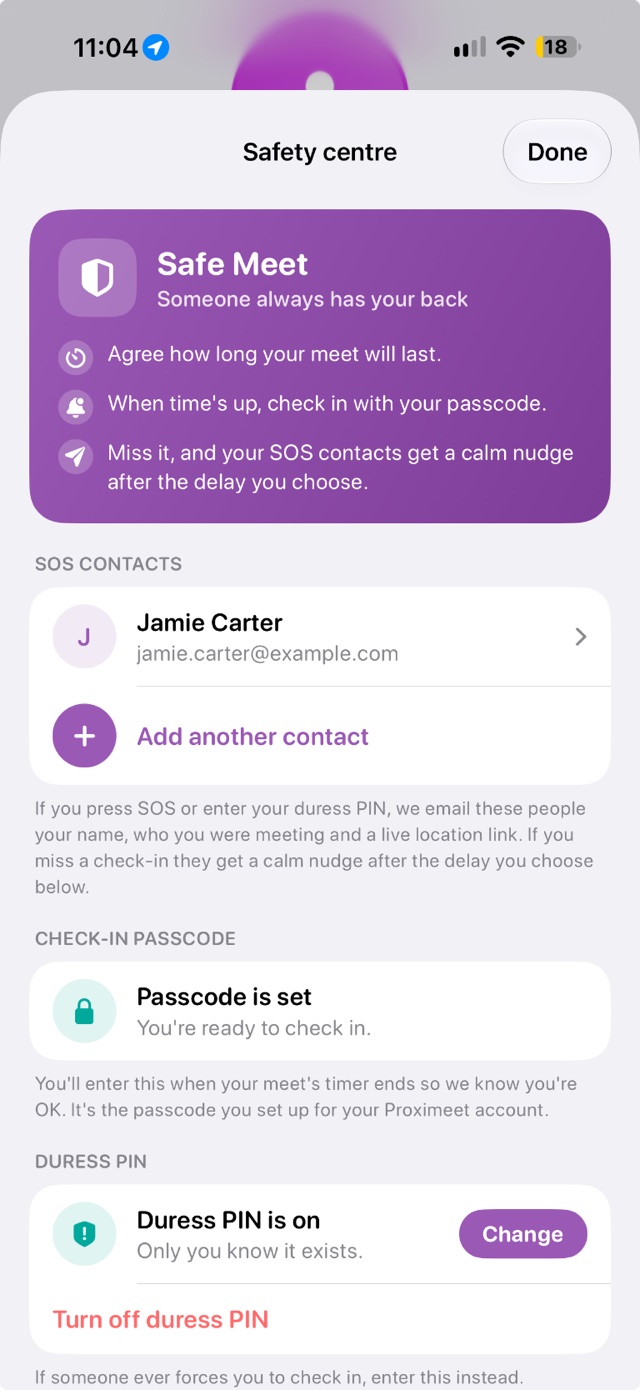
Plan your check-in, manage what you share, and meet smart — all from your Safety centre.
Add people you trust — an SOS sends them your name, your meetup details and a live location link.
Forced to check in? Enter your duress PIN instead. ProxiMeet looks normal but quietly alerts your SOS contacts.
Choose who can see where you are during a live meet-up.
Get a buzz if you leave somewhere you feel safe. Only you can see your places.
Stay offline automatically at the places you save, like home or the office.
A short safety reminder each time a meet-up starts.
Do your part
The app brings the tools. You bring the habits.
The prep
The place
The meetup
The ground rules
ProxiMeet helps you meet someone new based on shared interests and proximity — then arrange to meet in person. It’s built for adults 18 and older.
Everyday passions — think music, books, photography, gaming, film, fitness, and more. You choose what represents you.
ProxiMeet uses a map-style view to help you discover people nearby with shared interests. From there, you can send a connection request.
Yes — every person is verified before they’re able to connect and meet with you.
Every meetup is timed: you set how long it lasts, check in with your passcode when it ends, and if you miss a check-in your SOS contacts get an alert. You can also share your live location with someone you trust during a meetup — and you always choose which requests to accept and who to block. More meetup tips live in our Safety & Choice section.
ProxiMeet doesn’t track your location until you go online, and you never appear online unless you choose to. You can save hidden places — like home or the office — where ProxiMeet keeps you offline automatically, and closing the app logs you out so you’re never visible in the background.
Right now — ProxiMeet is live. Download it on the App Store or Google Play. If it isn’t available in your city yet, join the waitlist and you’ll hear the day it arrives.
No. Connections start with a request you choose to send or accept — and chat only opens once both of you are in. What happens next is always up to you.
ProxiMeet is live
Free to download. Not in your city yet? Join the waitlist — we’re rolling out city by city.
Let’s talk
Support, feedback, press, or partnerships — send us a message and we’ll get back to you.